
RDP vs. VPN vs. proxy: what’s the difference (and which one do you need)?
If you’re earning USD online, running survey panels, managing affiliate campaigns, handling client social accounts, or scraping data for a gig — you’ve probably run into the terms RDP, VPN, and proxy thrown around like they mean the same thing. They don’t.
All three change how your traffic connects to the internet, but they work in completely different ways. Pick the wrong one and you end up with a slow connection, a wasted subscription, or worse — a flagged and banned account. Here’s a straightforward breakdown of how each one works, how they differ, and which one actually fits your setup.
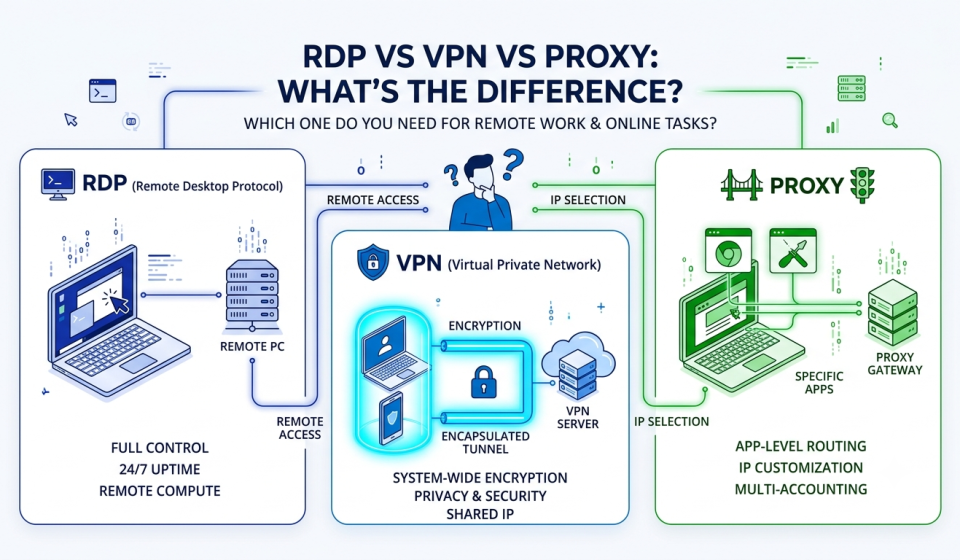
Quick comparison overview
| Feature | RDP | VPN | Proxy |
| What it does | Controls a distant machine remotely | Encrypts your entire system’s traffic | Routes specific app traffic through an IP address |
| IP address | Shows the IP of the remote machine | Shows the IP of the VPN server | Shows the IP assigned by the proxy provider |
| Processing power | Uses the remote computer’s CPU/RAM | Uses your local computer’s hardware | Uses your local computer’s hardware |
| Setup level | Medium (needs credentials/client) | Low (simple app switch) | Low to medium (browser/tool settings) |
| Best for | Running heavy software, 24/7 tasks | Privacy, encryption, global access | Scraping, multi-accounting, geo-targeting |
1. Proxy — the target-specific gateway
A proxy sits between your browser (or a specific app) and the website you’re visiting. Instead of connecting directly, your request goes through the proxy first, which forwards it under a different IP address.
Key characteristics:
- App-level scope — unlike a VPN, a proxy usually only routes traffic for the specific app you configure, such as a browser extension, anti-detect browser, or scraper
- IP customization — proxies give you the most control over IP type, including datacenter, static ISP, and residential
- No built-in encryption — a proxy masks your IP, but it won’t encrypt your overall system traffic on its own
Best used for:
- Managing multiple social media or client accounts on dedicated IPs
- Accessing geo-locked survey platforms without tripping detection bots
- High-volume web scraping and automation scripts
2. VPN — system-wide security and encryption
A VPN builds an encrypted tunnel between your device and a remote server. Once it’s on, everything leaving your device — browser, background apps, system updates — passes through that tunnel.
Key characteristics:
- Device-wide encryption — stops your ISP, hackers on public wifi, or network admins from seeing your activity
- Shared IP addresses — most commercial VPNs assign IPs that change dynamically or are shared across hundreds of users at once
- Plug-and-play simplicity — usually a single app with a one-click toggle
Best used for:
- General privacy and securing your connection on public wifi
- Browsing region-restricted content and streaming
- Encrypting all outbound traffic without setting up each tool separately
3. RDP — full control of a distant computer
RDP (remote desktop protocol) is a different animal entirely. Instead of masking your connection, it hands you live visual control over a separate computer hosted elsewhere — your clicks and keystrokes go to the remote machine, and its screen streams back to you.
Key characteristics:
- Remote compute power — whatever you run uses the remote machine’s CPU, RAM, and storage, not your own device
- 24/7 uptime — tasks keep running even after you shut your local computer off
- Dedicated OS environment — a full Windows or Linux desktop, isolated from your own
Best used for:
- Running automated software or bots around the clock
- Executing resource-heavy apps on a low-spec local device
- Keeping a static, isolated environment for higher-security remote work
FAQ: RDP, VPN, and proxy
A VPN or a proxy, generally — both have low-cost or free entry tiers. RDP usually costs more since you’re renting an entire remote machine’s resources.
Yes — some setups layer a proxy on top of a VPN for extra IP control alongside encryption, though it adds complexity and can slow your connection further.
Rarely. RDP is built for heavier, always-on tasks like running bots continuously. Most survey or freelance work only needs a proxy or VPN.
Not fully — a proxy hides your IP but doesn’t encrypt your traffic the way a VPN does. If anonymity is your main goal, a VPN (or both together) is the safer bet.
Which one should you choose?
- Choose a proxy if you need precise control over IP locations to manage accounts, bypass regional blocks, or scrape data without touching your whole network setup.
- Choose a VPN if your priority is privacy, encryption across everything you do, or safe browsing on networks you don’t trust.
- Choose RDP if you need a machine that stays online 24/7, runs heavy software remotely, or gives you the power of hardware you don’t personally own.